ข่าวสารทั่วไป
- หน้าแรก
- ข่าวสารทั่วไป
- Windows 11 ปรับโฉม Start Menu ใหม่
Windows 11 ปรับโฉม Start Menu ใหม่ พร้อมฟีเจอร์ AI ใน Notepad, Paint, Snipping Tool
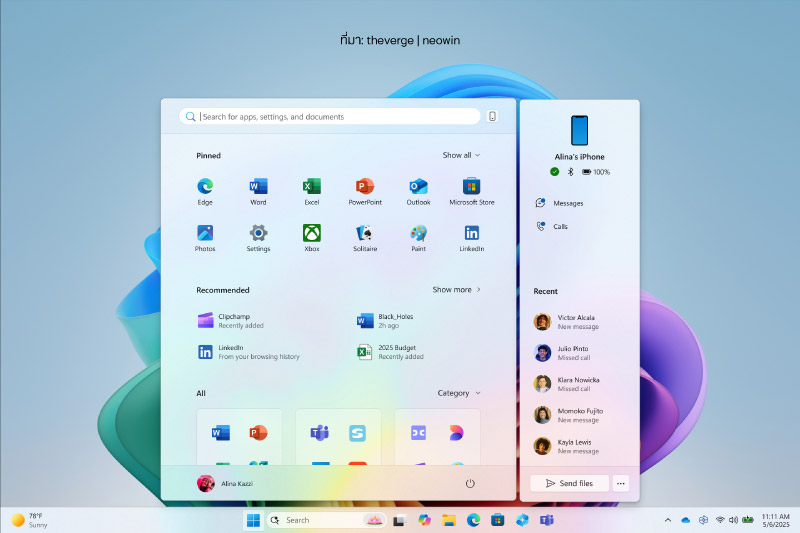
Microsoft ได้เปิดตัวอัปเดตใหม่สำหรับ Windows 11 ที่มาพร้อมกับการปรับปรุงครั้งใหญ่ในหลายด้าน โดยเฉพาะเมนู Start และแอปพื้นฐานอย่าง Notepad, Paint และ Snipping Tool
- ฟีเจอร์ AI ในแอปพื้นฐาน
- Notepad: ฟีเจอร์ "Rewrite" ช่วยให้ผู้ใช้สามารถปรับแต่งข้อความโดยใช้ AI เพื่อเปลี่ยนสำนวน ปรับโทน หรือย่อความได้อย่างง่ายดาย
- Paint: เพิ่มฟีเจอร์ Generative Fill และ Generative Erase ที่ใช้ AI ในการเติมหรือลบส่วนของภาพตามคำสั่งข้อความ
- Snipping Tool: สามารถครอบตัดภาพอัตโนมัติและคัดลอกข้อความจากภาพได้
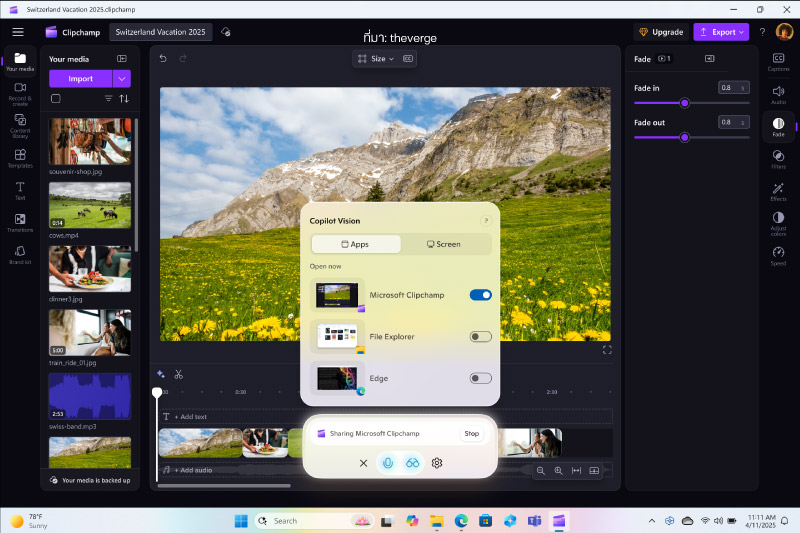
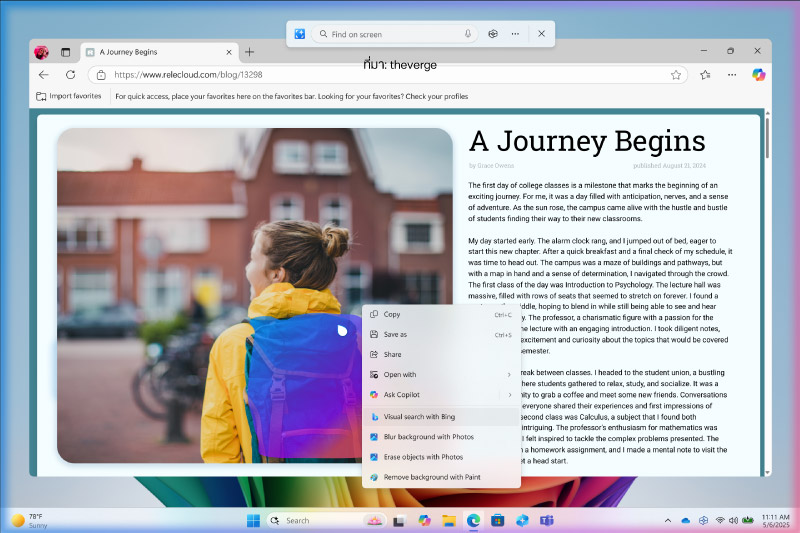
ที่มา : droidsans | theverge | neowin
<p style="text-align:center"><span style="font-size:36px"><strong>Windows 11 ปรับโฉม Start Menu ใหม่ พร้อมฟีเจอร์ AI ใน Notepad, Paint, Snipping Tool</strong></span></p>
<p style="text-align:center"> </p>
<p style="text-align:center"><span style="font-size:36px"><strong><img alt="" src="https://www.jib.co.th/img_master/uploads/Content_5_/IT_NEWS/202505/20250510/20250510-ITNEWS-800-01-01.jpg" style="height:533px; width:800px" /></strong></span></p>
<p> </p>
<p><span style="font-size:22px"> <strong>Microsoft</strong> ได้เปิดตัวอัปเดตใหม่สำหรับ <strong>Windows 11</strong> ที่มาพร้อมกับการปรับปรุงครั้งใหญ่ในหลายด้าน โดยเฉพาะ<strong>เมนู Start</strong> และแอปพื้นฐานอย่าง <strong>Notepad, Paint</strong> และ <strong>Snipping Tool</strong></span></p>
<ul>
<li><span style="font-size:22px"><strong>ฟีเจอร์ AI ในแอปพื้นฐาน</strong></span></li>
<li><span style="font-size:22px"><strong>Notepad:</strong> ฟีเจอร์ "Rewrite" ช่วยให้ผู้ใช้สามารถปรับแต่งข้อความโดยใช้ AI เพื่อเปลี่ยนสำนวน ปรับโทน หรือย่อความได้อย่างง่ายดาย</span></li>
<li><span style="font-size:22px"><strong>Paint:</strong> เพิ่มฟีเจอร์ Generative Fill และ Generative Erase ที่ใช้ AI ในการเติมหรือลบส่วนของภาพตามคำสั่งข้อความ</span></li>
<li><span style="font-size:22px"><strong>Snipping Tool:</strong> สามารถครอบตัดภาพอัตโนมัติและคัดลอกข้อความจากภาพได้</span></li>
</ul>
<p style="text-align:center"> </p>
<p style="text-align:center"><img alt="" src="https://www.jib.co.th/img_master/uploads/Content_5_/IT_NEWS/202505/20250510/20250510-ITNEWS-800-01-02.jpg" style="height:533px; width:800px" /></p>
<p style="text-align:center"> </p>
<p style="text-align:center"><img alt="" src="https://www.jib.co.th/img_master/uploads/Content_5_/IT_NEWS/202505/20250510/20250510-ITNEWS-800-01-03.jpg" style="height:533px; width:800px" /></p>
<p style="text-align:center"> </p>
<p style="text-align:center"><em>ที่มา : <a href="https://droidsans.com/windows-11-gets-a-redesigned-start-menu-text-formatting/" target="_blank">droidsans</a> | <a href="https://www.theverge.com/news/661587/microsoft-windows-11-start-menu-copilot-ai-agent-settings-menu" target="_blank">theverge</a> | <a href="https://www.neowin.net/news/windows-11-gets-a-redesigned-start-menu-text-formatting-in-notepad-and-more/" target="_blank">neowin</a></em></p>


